Transform any sound into a living, breathing work of art — directly in your browser. No downloads. No installs. Instant real-time visuals from your mic or system audio.
The WebGuysLLC Audio Visualizer is a free, browser-based tool that converts live audio input into stunning real-time graphics. Whether you're listening to your favorite playlist, hosting a live stream, producing a podcast, or just jamming on your guitar, our visualizer captures every frequency, beat, and nuance and renders it as a dynamic visual experience — right inside your browser tab.
Unlike desktop applications that require installation and configuration, our tool runs entirely on the web. Simply open the visualizer, choose your audio source — microphone or system audio — and watch your sound come alive. There's nothing to set up and nothing to pay for. It's audio visualization the way it should be: instant, beautiful, and accessible to everyone.
At its core, the visualizer uses the Web Audio API to perform a real-time Fast Fourier Transform (FFT) on your incoming audio signal. This breaks your audio down into its individual frequency components and maps them onto the canvas at 60 frames per second. The result is a smooth, responsive, and mesmerizing display that reacts to every sound in real time. You can adjust the sensitivity slider to make it react to quiet or loud environments, and the smoothing slider controls how fluidly the visualization transitions between frames — giving you everything from sharp, punchy responses to hypnotic, flowing motion.
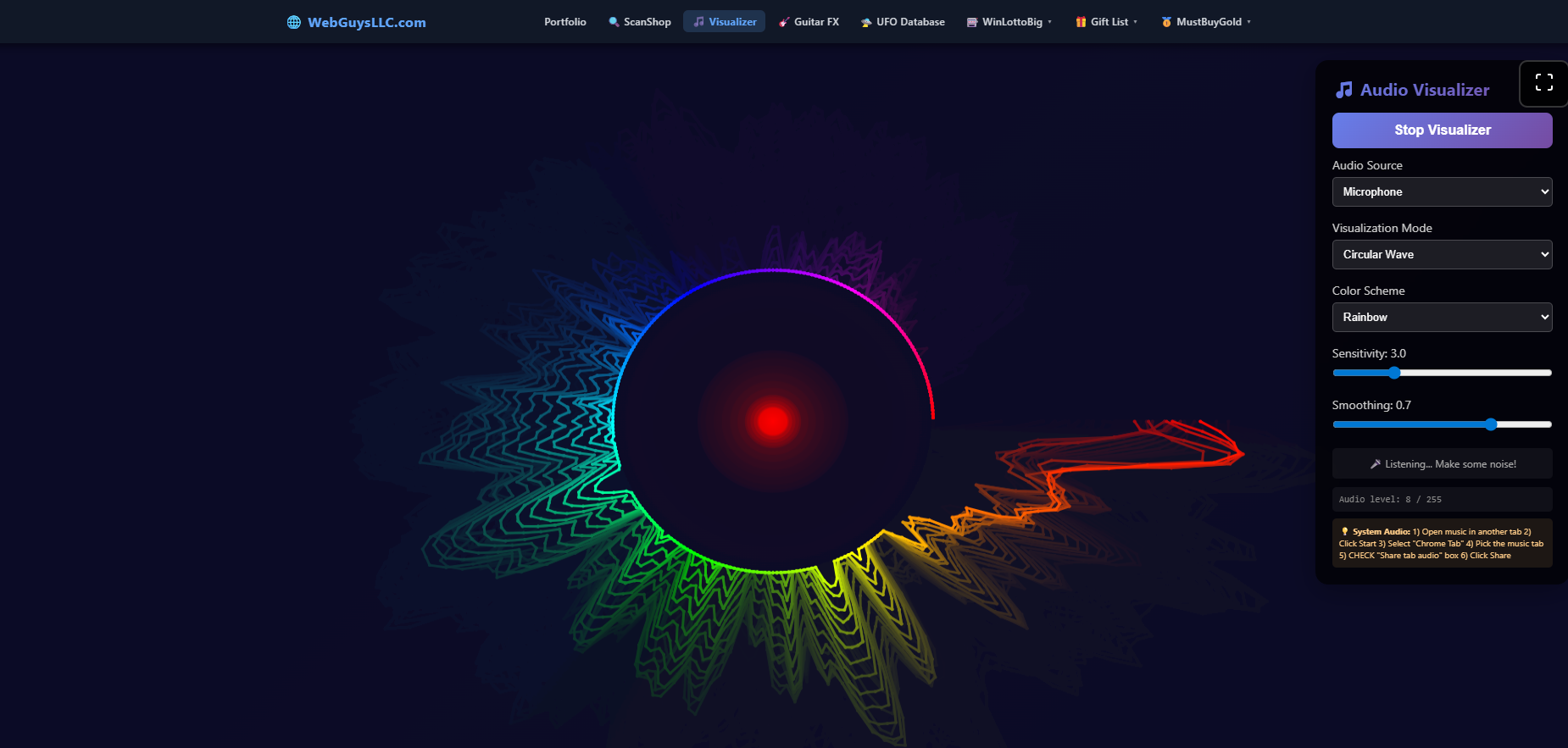
The tool comes loaded with eight distinct visualization modes, each with its own look, feel, and best use case. The classic Frequency Bars mode gives you a traditional EQ-style bar chart. Circular Wave wraps that frequency data into a stunning radial bloom — the mode shown above. Waveform renders a clean oscilloscope trace. Beyond those foundations, you can step into more creative territory with Particle Field (audio-reactive floating particles), Radial Burst (explosive outward spikes), Frequency Spectrum (a smooth gradient ribbon), Galaxy Stars (a starfield that pulses to the beat), and the fan-favorite UFO Flight mode — a playful, animated experience unlike anything else in a browser visualizer.
Paired with a selection of color schemes — including Rainbow, Ocean, Fire, Neon, and Monochrome — you can dial in exactly the right look for your brand, mood, or broadcast. Every combination is fully customizable in real time, so you can tweak as you go without ever pausing or restarting.
Content creators, musicians, DJs, and streamers have found dozens of creative applications for this tool. It works seamlessly as an OBS visualizer overlay using browser source capture, making it effortless to add professional-grade audio visuals to your stream layout. Dedicated guides for YouTube visualizer setups and Twitch visualizer integrations walk you through exactly how to get the most out of it in each platform's unique environment.
We built this tool because we believe great software should be free and frictionless. The WebGuysLLC Audio Visualizer requires no account, no subscription, and no credit card. It just works. Hit the button above to launch it now and start making your audio visual.
Every piece of music deserves a visual that matches its energy. Switch between any of the eight modes in real time — no reloading, no interruptions.
The classic EQ-style display. Vertical bars span the full frequency range from deep bass on the left to crisp highs on the right, each one jumping in real time to its matching frequency band. Frequency Bars is the go-to mode for producers monitoring a mix, DJs visualizing a set, or anyone who loves the iconic club-PA look for their stream or video background.
Read the full guide →The fan-favorite. Frequency data radiates outward from a central point, forming a mesmerizing flower-like bloom that pulses and morphs with every sound. Pair it with the Rainbow color scheme for the full effect — a swirling, multicolored mandala that captivates viewers on streams, music videos, and ambient displays alike.
Read the full guide →Clean, minimal, and hypnotic. Waveform renders your audio as a live oscilloscope trace — a smooth, undulating line that ripples with every vibration in the signal. Perfect for podcasters, musicians who want an understated visual layer, and streamers who prefer a polished, professional aesthetic over a louder display.
Read the full guide →Hundreds of individual particles float across the canvas, their movement, size, and speed driven entirely by your audio. Loud bass kicks scatter them outward; quiet passages let them drift in gentle constellations. The result is an organic, almost living visual that feels completely different from bar and wave modes — great for ambient or electronic music.
Try it in the app →Spikes explode outward from the center in perfect symmetry, detonating on every beat and frequency hit. Radial Burst is high-energy, high-impact, and impossible to ignore — making it a standout choice for EDM streams, gaming highlight reels, and any content where you want the visual to feel as powerful as the sound.
Try it in the app →A smooth, gradient-filled ribbon of color flows across the canvas, its shape sculpted by the live frequency data beneath it. Unlike the sharp bars of Frequency Bars mode, Frequency Spectrum fills the space with a fluid, painterly quality — ideal for lo-fi streams, chill-hop videos, and any content with a relaxed, artistic feel.
Read the full guide →A deep-space starfield that breathes with your music. Stars accelerate and pulse outward on loud transients, then gently drift back into the cosmos during quieter moments. Galaxy Stars turns any audio into a hypnotic journey through space — a favorite for ambient, cinematic, and lo-fi content creators looking for something truly unique.
Try it in the app →The wildcard mode. An animated UFO soars across the canvas, its flight path, speed, and light trails all driven by the audio signal. UFO Flight is unlike anything else in a browser-based visualizer — fun, playful, and guaranteed to get a reaction from your chat. Use it for comedy streams, gaming content, or just to keep things weird and wonderful.
Try it in the app →Every parameter updates live — no need to stop or restart the visualizer. Dial in the exact look and feel you want in seconds.
Choose from a curated palette of color modes — including Rainbow (the full visible spectrum cycling through every hue), Ocean (deep blues and teals), Fire (reds, oranges, and golds), Neon (electric greens and pinks), and Monochrome (a single-color look that keeps things clean and sophisticated). Switching color schemes takes one click and updates instantly without interrupting playback.
The Sensitivity slider controls how dramatically the visualization reacts to incoming audio. Turn it up and even quiet sounds will produce big, expressive visuals. Turn it down and only the loudest peaks will register — great for high-volume environments or when you want a more restrained look. The default of 3.0 is calibrated to work well for most music and microphone inputs right out of the box.
Smoothing controls how quickly the visualization transitions between states. A low smoothing value produces sharp, snappy reactions that follow every transient precisely — ideal for fast, percussive music. A high smoothing value (like the default 0.7) produces fluid, flowing motion that blends frames together, giving a more organic and cinematic quality. Finding the right balance between Sensitivity and Smoothing is the key to unlocking the best visuals for your specific audio source.
Whether you're broadcasting live, uploading to YouTube, or running a full OBS production setup, there's a configuration that works perfectly for you.
Add professional audio visuals to your YouTube uploads. Our guide covers how to record the visualizer output alongside your audio using screen capture, ideal for music uploads, lyric videos, and ambient audio content that keeps viewers engaged longer.
Full YouTube guide →Level up your Twitch stream with a live audio visualizer overlay. React to music during just-chatting sessions, add visual flair to your BRB screen, or run the visualizer as a full-panel background while you play. Our Twitch guide shows you exactly how.
Full Twitch guide →Add the visualizer as a Browser Source in OBS Studio in minutes. Capture it as a layer in your scene, key out the background, and overlay it on gameplay, facecam, or a static screen. Our OBS guide walks through every step for a seamless production setup.
Full OBS guide →Eight visualization modes. Real-time controls. Zero installs. Powerful enough for professionals, instant enough for everyone.
Try It Free →Capture from your microphone or route system audio through your browser tab for any audio source.
Smooth, low-latency rendering powered by the Web Audio API and HTML5 Canvas.
Frequency Bars, Circular Wave, Waveform, Particle Field, Radial Burst, Frequency Spectrum, Galaxy Stars, and UFO Flight — all switchable in real time.
Rainbow, Ocean, Fire, Neon, Monochrome — switch colors live without pausing the visualization for even a frame.
Fine-tune how the visualizer responds to quiet, loud, fast, and slow audio in real time.
Expand to full screen for an immersive experience or to capture a clean OBS window.
No account required. No ads on the tool page. No hidden tiers. Just open and use it.
Quick answers to the things people ask most before hitting Launch.
Launch the free audio visualizer now and see your music come alive in seconds. No sign-up. No software. Just sound and light.